When you click on links to various merchants on this site and make a purchase, this can result in this site earning a commission. Affiliate programs and affiliations include, but are not limited to, the eBay Partner Network.
The HEXBOX: A Smarter, Cleaner, More Powerful Ghost Box
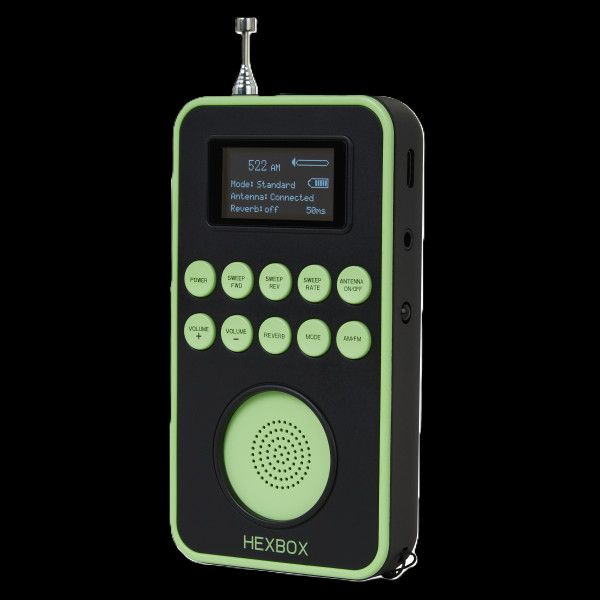
The HEXBOX isn’t just another ghost box — it’s a leap forward in intelligent scanning. Designed for investigators who want clearer sessions and fewer false positives, the HEXBOX introduces a feature rarely seen in compact ghost boxes: the ability to skip every detected radio station and scan only the white noise between them. That means when you hear a voice, you can trust it didn’t come from a DJ, a commercial, or a talk show. It’s just you, the white noise, and whatever wants to speak.
With eight sweep speeds (50–400 ms), forward and reverse scanning, AM/FM support, and a built‑in Bluetooth speaker mode, the HEXBOX packs serious versatility into a lightweight, travel‑ready design. Whether you’re running traditional sweeps or pairing it with your favorite ghost‑hunting apps, this device adapts to your style.
How It Works
The HEXBOX offers three distinct scanning modes, each designed for different investigative approaches:
Standard Mode
Scans through all stations normally — ideal for baseline sessions.
Channel Hop Mode
Jumps only between active stations.
Channel Skip Mode (the star of the show)
This is where the HEXBOX shines. When powered on, it performs an initial scan to identify all active stations. In Channel Skip Mode, it omits every one of those stations, leaving you with a clean sweep of pure white noise. This dramatically reduces contamination and helps investigators focus on genuine anomalies.
You can also disconnect the antenna if you prefer an even quieter sweep.
Word Bank Mode (Micro‑SD Card)
The HEXBOX includes a creative Word Bank Mode that plays short audio files randomly from a micro‑SD card (not included). You can load your own MP3 or WAV files — single words, phrases, tones, musical notes, sound effects, Morse code, animal calls, anything you want to experiment with.
Investigators often use this mode to see whether the “random” playback aligns meaningfully with activity at a location. It’s a fun and flexible tool for experimentation.
How to Use the HEXBOX
Power On
Press and hold the Power button. The HEXBOX will run its initial scan — keep the antenna extended so it can detect all stations for Channel Skip Mode.
Choose Your Mode
Select Standard, Channel Hop, or Channel Skip.
Pick AM or FM
Choose your preferred band.
Start Scanning
Use Scan Forward or Scan Reverse.
Adjust Sweep Speed
Choose from eight speeds (50–400 ms).
Add Reverb (Optional)
Many investigators feel a touch of reverb helps EVPs stand out more clearly.
Antenna Options
Choose Antenna Connect or Disconnect depending on your scanning style.
Key Features
- Unique Channel Skip Mode for cleaner, DJ‑free scanning
- 8 adjustable sweep rates (50–400 ms)
- 3 scanning modes: Channel Skip, Channel Hop, Standard Sweep
- Forward & reverse scanning
- Adjustable reverb
- Antenna disconnect option
- Word Bank Mode (micro‑SD card not included)
- Bluetooth mode — use the HEXBOX as a speaker for ghost‑hunting apps
- Rechargeable (USB‑C cable included)
- Telescopic antenna
- Wrist strap 4 oz
- Dimensions: 2.5 in (W) × 4.5 in (H) × 1 in (D)
- Antenna: Extends to 11.5 in