When you click on links to various merchants on this site and make a purchase, this can result in this site earning a commission. Affiliate programs and affiliations include, but are not limited to, the eBay Partner Network.
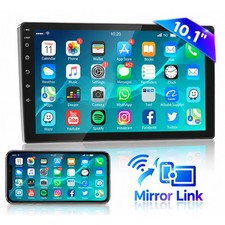
10.1\" Android Double 2Din Touch Screen Car Stereo Radio GPs Navi WiFi Bluetooth Description 10.1\'\' Android 13.0 Car Stereo – Mirror Link, GPS, WiFi
🔴 Please NOTE: This item does not support Apple CarPlay or Android Auto functionality. If you have any questions about this car radio, please feel free to contact us – we are happy to help. ⚠️ Important – Please Read Before Ordering
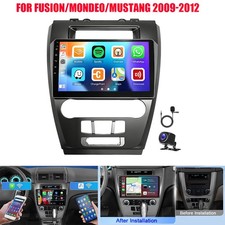
• Confirm your vehicle’s dash size – this unit is designed for a standard double‑DIN installation slot.
• Professional installation is recommended – wiring and fitting may require expertise. We suggest having it installed by a qualified car audio specialist. Product Overview
Upgrade your driving experience with this 10.1\'\' 2.5D tempered glass mirror auto radio MP5 player powered by Android 13.0. It offers a seamless blend of entertainment, navigation, and connectivity for virtually any vehicle with a double‑DIN dashboard. With mirror link (iOS one‑way, Android two‑way), built‑in GPS, WiFi, Bluetooth 4.0, steering wheel control, and support for an optional rear view camera and driving recorder, this unit transforms your dashboard into a smart infotainment hub.
Key Features
- 10.1\'\' 2.5D Tempered Glass Screen – high‑definition, scratch‑resistant, and responsive touch
- Dual‑system Mirror Link – iOS one‑way projection; Android two‑way connection (both touch and reverse control)
- Built‑in GPS Navigation – pre‑loaded offline maps; with WiFi, use Google Maps for real‑time guidance
- Built‑in WiFi – access online maps, streaming, and app updates
- Steering Wheel Control – keep your hands on the wheel while adjusting volume, tracks, and calls
- Bluetooth 4.0 – hands‑free calling, A2DP music streaming, and phonebook auto‑sync
- Dual USB Input – connect two devices for charging and media playback
- File Manager – download, install, and manage thousands of Android apps directly
- Multi‑language Support – up to 40 languages including English, Spanish, French, German, etc.
- Wireless Music Streaming – play music from your phone via Bluetooth, or use USB connection
- FM Radio with 18 Presets – enjoy clear radio and even stream online music via FM transmitter
- Automatic Time Setting – sync via network or GPS, or set manually
Technical Specifications System Android 13.0 Chipset 8227L-DEMO Screen Size 10.1\'\' Memory 1GB RAM + 16GB ROM Screen Resolution 1024×600 Mirror Link Android (two‑way) / iOS (one‑way) Radio Band FM (NXP6851 chip) Power Output 4 × 45W (amplifier chip AC7315) Operating Temperature ‑40°C to 80°C Steering Wheel Control Supported Bluetooth Version 4.0 Video Output Supported Maps Built‑in offline maps (Google Maps via WiFi) WiFi Built‑in USB Ports Dual USB interface Audio Formats APE, FLAC, WAV, MP3, WMA, etc. Video Formats MKV, RMVB, AVI, MP4, MDV, etc. Picture Formats PNG, JPEG, JPG, GIF, WBMP, BNP, etc. Factory Setting Keyword 8888 Languages 40+ including English, Chinese, Spanish, French, German, Italian, Korean, Japanese, Arabic, Russian, etc. Package Includes
- 1x Car MP5 Player (main unit)
- 1x Power Cable
- 1x GPS Antenna
- 1x Camera Input Cable
- 1x RCA Input and Output Cable
- 2x USB Cables
- 2x Metal Frames (mounting brackets)
- 4x Screws
- 1x Instruction Manual
Troubleshooting – Frequently Asked Questions
1. Why can\'t I turn on the car radio?
1.1 Please check that the voltage is 12V – this unit requires a 12V supply. - 1.2 For bench testing, connect the red and yellow wires together to the positive (+) terminal, and the black wire to the negative (–) terminal.
- 1.3 Replace the fuse with one of the same type and rating, then test again.
Note: You must use the supplied power cable – do not connect the original car plug directly to the unit.
2. Why does the screen show \"No Signal\" when reversing?
Check that the camera\'s video cable is properly connected to the \"CAM IN\" port on the radio.
3. Why does the camera display \"!\" and \"Can\'t watch video while driving\" when using USB to watch videos?
Go to the settings menu and turn off the \"Video Warning\" function – then the warning will disappear.
4. Why can\'t I search for FM stations?
4.1 Ensure the radio antenna is inserted. - 4.2 Try plugging the antenna in firmly several times to ensure good contact.
- 4.3 The signal in your location may be weak – move to an area with better reception.
- 4.4 The vehicle\'s antenna may be faulty – test with a different antenna if possible.
5. Why can\'t I connect Bluetooth?
5.1 On your phone, turn on Bluetooth and search for devices – select the player\'s Bluetooth name and pair. If a passcode is needed, try 0000, 1234, or 123456. - 5.2 Test with another phone to rule out device compatibility issues.
- If all steps fail, unplug the main connector from the back of the unit, wait 3 minutes, then plug it back in and retry.
📌 Important Installation Notes:
• Professional installation is highly recommended – this unit requires correct wiring and dash fitting. A qualified car audio specialist can ensure a secure and functional installation.
• Before installation, verify that your vehicle’s factory steering wheel controls are compatible (this unit supports them).
• After installation, you may need to set the correct time zone and language via the settings menu (factory keyword: 8888).
• For mirror link, Android devices require the “Zlink” app (pre‑installed) and USB debugging enabled; iOS uses one‑way projection.
• Optional accessories (rear camera, driving recorder) are not included – they must be purchased separately. ✓ 2‑Year Warranty ✓ 30‑Day Easy Returns ✓ Secure Checkout ✓ UK‑Based Customer Support