When you click on links to various merchants on this site and make a purchase, this can result in this site earning a commission. Affiliate programs and affiliations include, but are not limited to, the eBay Partner Network.
4 Bay Type B【Reliable External Storage System for Individuals】This 4 bay hdd enclosure support up to 88TB external expanded storage. The front door adopt user-friendly PUSH Design for easy install and replacement of hard drives. It is an ideal choice for personal storage at home and office. It can support different drive type(s)-2,5"/3,5" SATA HDD/SSDs, so you can take advantage of your hard drives' potential fully.
【88TB Large Storage Capacity 】The 4 bay hard drive enclosure can house up to 4 hard drives, single disk support up to 22TB. Such Large capacity supported let you handle various work demands easily, like digital imaging, video production/editing, duplicating footage, create and manage archives.
【Aluminum-Alloy Enclosure & 80mm Silent Fan】The 4 bay sata enclosure built with rugged heat-dissipating aluminum shell, front and rear with cooling holes, a 80mm intelligent temperature control fan inside can effectively accelerate air convection and rapid cooling. The fan adjusts its speed automatically based on the hard drive's temperature, providing optimal cooling with low noise.
【For 2.5"/3.5" SATA HDD & SSD】Yottamaster 4 bay USB3.0 HDD enclosure designed for both 2.5 inch SATA and 3.5 inch SATA HDD/SSDs. It comes with 4 removeable trays, allowing for easy installation and replacement of either the large desktop hard disk drives or the portable laptop drives and SSD's.The included screws securely fix the hard drives to the trays, effectively protecting them from shock and interface damage.
【5Gbps Transfer Rate】This 4 bay USB storage adopt SATA III protocol, transfer rate up to 5Gbps (MAX). Equipped with a versatile USB3.0 Type-B interface to connect other peripheral devices. Compatible with Windows, Mac systems.
【Important Note】This model is a non-RAID version and does not support hardware RAID. If you wish to set up RAID, you can only set up software RAID with the tools in your system. For instance, Mac OS users can utilize the RAID Assistant in Disk Utility. The RAID Manager software is compatible with RAID version enclosures only.Aluminum-Alloy Enclosure with LED Indicator Lights
- Blue light: Power on
- Blinking blue and red alternately: Reading data
- Red light: Hard drive error
Precautions for Power Supply Plug
Please refer to the picture attached to insert the plug as the indicated direction, or the enclosure won't work properly if the plug is inserted in a wrong direction.
Make sure that the flat end of the power connector is facing up.
Product SpecificationProduct ModelYottamaster PS400U3Product alloy (housing) + ABS plastic (tray)ColorSilverFan80mmPower Supply12V 6.5ACompatible Drive2.5/3.5 inch SATA HDD/SSDSupported Capacityup to 22TB x 4Output InterfaceUSB3.0 Type-BData Transfer Rate5Gbps (theoretical value)Compatible SystemWindows XP/Vista/7/8/8.1/10/11, MAC OS 10.8 or laterPackge Content1 x HDD Enclosure, 1 x USB cable [Type-A To Type-B] (100cm), 1 x 12V6.5A power adapter, 1 x power cable, 1 x screwdriver & screw set, 1 x User Manual4 Bay Type B-RAIDThe PS400RU3 is NOT a NAS, it is a DAS and support RAID.
If you are looking for something solid to house your growing need for external drives. And if you want one enclosure that could house them all instead of having multiple drives hanging off the back of your iMac.
Hardware RAID 0 / 1 / 3 / 5 / 10 / JBOD/ CLONE array modes for controlling speed, capacity, or data redundancy, huge capacity for archiving, and enterprise-class drives dishing out intense performance so you can do what you do — better.
- Single disk support up to 22TB,
- PUSH design allows you to replace the hard drive more conveniently,
- USB3.1 (Gen1, 5Gbps) interface to SATA 3.0 6Gbps Transfer Speed.
- Dimensions and Weight: L x W x H: 25.2 x 13.6 x 16.9 cm, 9.92 x 5.35 x 6.65 inch. Weight: 3.33kg / 117.36 oz / 7.33 lb.
Troubleshooting Guide
- The device needs to be connected directly to your computer. Don‘t connect it via hub.
【Reliable 88TB External Storage】Yottamaster 4 bay hdd enclosure support up to 88TB (4 x 22TB) external expanded storage. The front door adopt user-friendly PUSH Design for easy install and replacement of hard drives. It is an ideal choice for personal storage at home and office. It can support different drive type(s)-2,5"/3,5" SATA HDD/SSDs, so you can take advantage of your hard drives' potential fully.【Flexible RAID for Customized Work Need】Yottamaster 3.5 hard drive enclosure supports RAID 0/1/3/5/10/JBOD(SPAN)/CLONE RAID modes. You can optimize/simplify your workflow by chosing suitable RAID configuration. You can choose hardware RAID for easy set without downloading application, or you can use Software RAID to set/manage RAID modes. It is the ultimate storage solution for demanding video workflows on location and in the studio.【Aluminum-Alloy Enclosure & 80mm Silent Fan】The 4 bay RAID sata enclosure built with rugged heat-dissipating aluminum shell, front and rear with cooling holes, a 80mm intelligent temperature control fan inside can effectively accelerate air convection and rapid cooling. The fan adjusts its speed automatically based on the hard drive's temperature, providing optimal cooling with low noise.【For 2.5"/3.5" SATA HDD & SSD】Yottamaster 4 bay RAID USB 3.0 enclosure designed for both 2.5 inch SATA and 3.5 inch SATA HDD/SSDs. It comes with 4 removeable trays, allowing for easy installation and replacement of either the large desktop hard disk drives or the portable laptop drives and SSD's.The included screws securely fix the hard drives to the trays, effectively protecting them from shock and interface damage.【6Gbps Transfer Rate】Yottamaster 4 bay Hard Drive RAID enclosure adopt SATA3.0 protocol, transfer rate up to 6Gbps (MAX). Equipped with a versatile USB3.0 Type-B interface to connect other peripheral devices. Compatible with most Windows systems.【Hard Drive Usage Note】If you are using a brand new hard drive, it may need to be formatted and partitioned before it can be recognized by the computer. Please remember to back up your data.Aluminum-Alloy Enclosure with LED Indicator Lights
- Blue light: Power on
- Blinking blue and red alternately: Reading data
- Red light: Hard drive error
Precautions for Power Supply Plug
Please refer to the picture attached to insert the plug as the indicated direction, or the enclosure won't work properly if the plug is inserted in a wrong direction.
Make sure that the flat end of the power connector is facing up.
RAID 5 Mode is the Most Cost-effective Choice For 4 Bay Hard Drive Enclosures4 Bay Type CPrevious page
Support max 22TB per disk
Support 3.5"/2.5" HDD/SSDInterface: SATA 3.1 Type C, Capacity: 22TB x 4 disks (total 88TB), Screws provided to fix the disks.
Next pageFor 3.5"/2.5" HDD/SSD 5Gbps High-Speed Transfer Built-in 80mm Silent Fan【Reliable External Storage System for Individuals】This 4 bay hdd enclosure support up to 88TB external expanded storage. The front door adopt user-friendly PUSH Design for easy install and replacement of hard drives. It is an ideal choice for personal storage at home and office. It can support different 2.5"/3.5" SATA HDD/SSDs, so you can take advantage of your hard drives' potential fully.【88TB External Storage Capacity 】Yottamaster multi-bay hard drive enclosure can house up to 4 hard drives, single disk support up to 22TB. Such Large capacity supported let you handle various work demands easily, like digital imaging, video production/editing, duplicating footage, create and manage archives.【Aluminum-Alloy Enclosure & 80mm Silent Fan】The 4 bay sata enclosure built with rugged heat-dissipating aluminum shell, front and rear with cooling holes, a 80mm intelligent temperature control fan inside can effectively accelerate air convection and rapid cooling. The fan adjusts its speed automatically based on the hard drive's temperature, providing optimal cooling with low noise.【6Gbps Transfer Rate】Yottamaster 4 bay hdd enclosure adopt SATA III protocol, transfer rate up to 6Gbps (MAX). Equipped with a versatile USB3.1 Type-C interface to connect other peripheral devices. Compatible with Windows, Mac systems.【For 2.5”/3.5” SATA Hard Drive】The 4 bay USB C hard drive enclosure is designed for 2.5”/3.5” SATA HDD or SSDs. Yottamaster aluminum sata hdd enclosure features with 4 removable trays, allowing for easy installation and replacement of either the large desktop hard disk drives or the portable laptop drives and SSD's.Wide CompatibilityY-Pioneer SeriesUSB3.1 Gen1 Type C 4 Bay Aluminum Hard Drive Enclosure
An external HDD docking station which can house multiple HDDs/SSDs in Mac style!
You can easily store photos, videos, movies, games, and other materials with a large capacity expandable to your personal Mac or PC.
Y-Pioneer series external SATA HDD enclosure can be widely applied with many devices such as PC, Macbook, smart TV, router, NAS, etc. It supports Windows XP/Vista/7/8/8.1/10/11, MAC OS 10.8 and above, and many Linux operating systems to easily meet your large data storage needs.
Product SpecificationProduct ModelYottamaster PS400C3Product alloy (housing) + ABS plastic (tray)ColorSilverFan80mmPower Supply12V 6.5ACompatible Drive2.5/3.5 inch SATA HDD/SSDSupported Capacityup to 22TB x 4Output InterfaceUSB3.1 Gen1 Type CData Transfer Rate5Gbps (theoretical value)Compatible SystemWindows XP/Vista/7/8/8.1/10/11, MAC OS 10.8 or later, LinuxPackge Content1 x HDD Enclosure, 1 x USB cable [Type-A To Type-B] (100cm), 1 x 12V6.5A power adapter, 1 x power cable, 1 x screwdriver & screw set, 1 x User Manual4 Bay Type C-RAIDYottamaster-Pioneer Series4 Bay USB-C RAID 2.5 & 3.5 Inch SATA Hard Drive Enclosure
The aluminum multi-bay USB C RAID enclosure can house up to 4 SATA hard drives, single disk support up to 22TB. Supports RAID 0/1/3/5/10/JBOD(SPAN)/CLONE RAID modes. You can optimize/simplify your workflow by chosing suitable RAID configuration.
The PS400RC3 is NOT a NAS, it is a DAS and support RAID.
If you are looking for something solid to house your growing need for external drives. And if you want one enclosure that could house them all instead of having multiple drives hanging off the back of your iMac.
Hardware RAID 0 / 1 / 3 / 5 / 10 / JBOD/ CLONE array modes for controlling speed, capacity, or data redundancy, huge capacity for archiving, and enterprise-class drives dishing out intense performance so you can do what you do — better.
- Single disk support up to 22TB,
- PUSH design allows you to replace the hard drive more conveniently,
- USB3.1 (Gen1, 5Gbps) Type-C interface to SATA 3.0 6Gbps Transfer Speed.
- Dimensions and Weight: L x W x H: 25.2 x 13.6 x 16.9 cm, 9.92 x 5.35 x 6.65 inch. Weight: 3.33kg / 117.36 oz / 7.33 lb.
Troubleshooting Guide
- The device needs to be connected directly to your computer. Don‘t connect it via hub.
【Reliable External Storage System for Individuals】Yottamaster 4 bay hdd enclosure support up to 88TB (4 x 22TB) external expanded storage. The front door adopt user-friendly PUSH Design for easy install and replacement of hard drives. It is an ideal choice for personal storage at home and office. It can support 2,5"/3,5" SATA HDD/SSDs, so you can take advantage of your hard drives' potential fully.【Flexible RAID for Customized Work Need】Yottamaster 4 bay hard drive enclosure supports RAID 0/1/3/5/10/JBOD(SPAN)/CLONE RAID modes. You can optimize/simplify your workflow by chosing suitable RAID configuration. You can choose hardware RAID for easy set without downloading application, or you can use Software RAID to set/manage RAID modes. It is the ultimate storage solution for demanding video workflows on location and in the studio.【Aluminum-Alloy Enclosure & 80mm Silent Fan】The 4 bay RAID sata enclosure built with rugged heat-dissipating aluminum shell, front and rear with cooling holes, a 80mm intelligent temperature control fan inside can effectively accelerate air convection and rapid cooling. The fan adjusts its speed automatically based on the hard drive's temperature, providing optimal cooling with low noise.【For 2.5"/3.5" SATA HDD & SSD】Yottamaster 4 bay USB C RAID HDD enclosure designed for both 2.5 inch SATA and 3.5 inch SATA HDD/SSDs. It comes with 4 removeable trays, allowing for easy installation and replacement of either the large desktop hard disk drives or the portable laptop drives and SSD's.The included screws securely fix the hard drives to the trays, effectively protecting them from shock and interface damage.【5Gbps Transfer Rate】This 4 bay SATA enclosure adopt USB3.1 protocol, transfer rate up to 5Gbps (MAX). Equipped with a versatile USB3.1 Type-C interface to connect other peripheral devices. Compatible with most Windows, Mac systems.【Hard Drive Usage Note】If you are using a brand new hard drive, it may need to be formatted and partitioned before it can be recognized by the computer. Please remember to back up your data.RAID 5 Mode is the Most Cost-effective Choice For 4 Bay Hard Drive Enclosures5 Bay Type BY-Pioneer Series5 Bay Hard Drive Enclosure for 2.5"/3.5" HDD/SSDs - 5 X 22TB
The aluminum multi-bay hard drive enclosure can house up to 5 SATA hard drives, single disk support up to 22TB. Such Large capacity supported let you handle various work demands easily, like digital imaging, video production/editing, duplicating footage, create and manage archives.
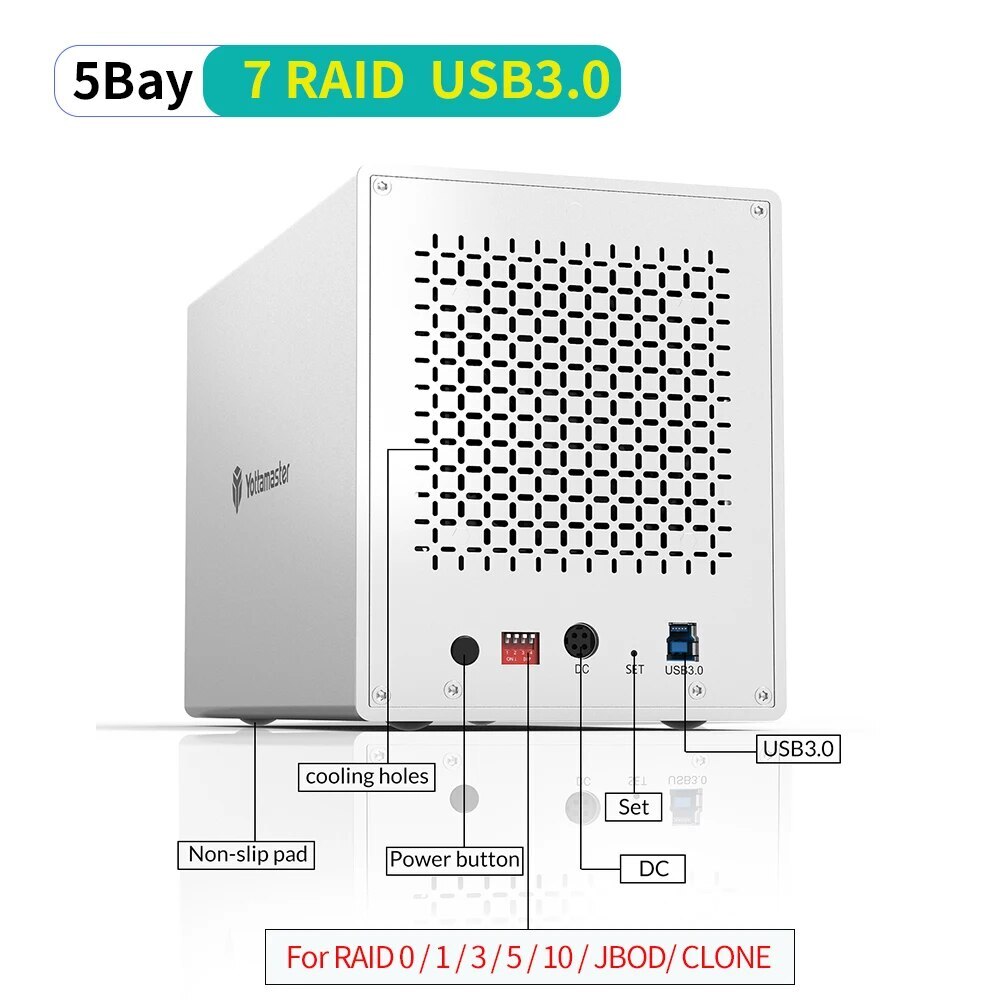
The PS500U3 is NOT a NAS, it is a DAS and does NOT support RAID【Massive 110TB Expandable Storage】Yottamaster 5 bay hdd enclosure holds up to 5 drives (2.5" or 3.5" SATA HDD/SSD), each supporting up to 22TB, giving you up to 110TB of fast, reliable external storage. Perfect as an external hard drive case for home office backup, video editing, photo archives, and large file management.【Easy Drive Swap】Yottamaster 5 bay external hard drive enclosure features a user-friendly PUSH-to-open door for easy install and replacement of hard drives. Yottamaster 5 bay sata hdd enclosure features with 5 removable trays, allowing for easy installation and replacement of either the large desktop hard disk drives or the portable laptop drives and SSD's.【Aluminum DAS for Cool Quiet】Unlike plastic enclosures that trap heat, this 5-bay hard drive enclosure uses an aluminum HDD case that naturally pulls heat away from your drives. Combined with an 80mm low-noise fan and front-to-back airflow vents, it effectively accelerate air convection for rapid cooling. Ideal for long term das storage use without overheating or loud noise. Aluminum 5 bay enclosure not only cools better but also protects your drives with a sturdy.【5Gbps Transfer Rate】This 5 bay hdd enclosure adopt SATA III protocol, transfer rate up to 5Gbps. Equipped with a versatile USB3.0 Type-B interface to connect other peripheral devices. Plug and play compatible with Windows and Mac systems. Note: New hard drives must be formatted and partitioned before they appear on your computer.【Non-RAID DAS】This PS500U3 model is a non-RAID direct-attached storage (DAS) unit. It does not support hardware RAID, but you can create software RAID using your OS. Not compatible with Yottamaster RAID LED Indicator Lights
- Blue light: Power on
- Blinking blue and red alternately: Reading data
- Red light: Hard drive error
Precautions for Power Supply Plug
Please refer to the picture attached to insert the plug as the indicated direction, or the enclosure won't work properly if the plug is inserted in a wrong direction.
Make sure that the flat end of the power connector is facing up.
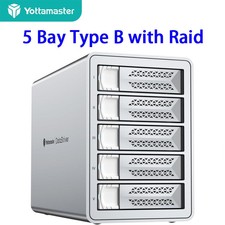
5 Bay Type B-RAIDThe PS500RU3 is NOT a NAS, it is a DAS and support RAID.The aluminum multi-bay RAID enclosure can house up to 5 SATA hard drives, single disk support up to 22TB. Supports RAID 0/1/3/5/10/JBOD(SPAN)/CLONE RAID modes. You can optimize/simplify your workflow by chosing suitable RAID configuration.【Reliable External 110TB Storage Space】Yottamaster 5 bay HDD enclosure supports up to 5 SATA hard disk drives with a maximum capacity of 22TB each, providing a total storage space of up to 110TB. It can accommodate a vast amount of files, photos, videos, and other data. This is particularly important for users who deal with large amounts of data, such as photographers, video editors, and individuals and businesses in need of backing up a significant number of files.【Support Hardware RAID Modes】Yottamaster 5 bay RAID enclosure supports RAID modes such as RAID 0/1/3/5/10/JBOD(SPAN)/CLONE. You can optimize/simplify your workflow by setting up an appropriate RAID configuration. You can choose hardware RAID for easy setup without downloading any application, or you can download RAID Manager software to set RAID modes.【For 2.5-inch/3.5-inch SATA Hard Drives】Yottamaster PS500RU3 external hard drive enclosure is compatible with both 2.5-inch and 3.5-inch SATA hard drives. It features a removable drawer-style hard drive tray design, constructed with high-quality ABS material. The hard drive tray is securely fastened with screws, providing additional stability and protection to ensure that the hard drive remains secure and intact during use.【Robust Aluminum Casing & Excellent Heat Dissipation】The 5 bay hard drive enclosure boasts a rugged aluminum alloy casing that ensures exceptional heat conductivity. With the inclusion of an 80mm low-noise fan, it enhances airflow for efficient heat dissipation. Furthermore, the enclosure is thoughtfully designed with many ventilation holes on the front and rear panels, enabling optimal air circulation and enhancing overall ventilation.【5Gbps Transfer Rate】Yottamaster 5-bay RAID hard drive enclosure adopts the USB 3.0 protocol with a transfer rate of up to 5Gbps (MAX). It is equipped with a versatile USB 3.0 Type-B interface to connect directly to your computer or other devices, enabling fast data transfer and backup. It is compatible with Windows, Mac systems.RAID 5 Mode is the Most Cost-effective Choice For 5-bay Hard Drive Enclosures
If you need to store a large amount of data while ensuring data security and integrity, RAID 5 mode is definitely a good option. Before performing any operation, PLEASE backup all your data to avoid data loss or damage.
If you are looking for a solid solution to accommodate your growing need for external drives, and if you prefer having all your drives housed in a single enclosure instead of having multiple drives connected to the back of your iMac, our product offers the perfect solution. With hardware RAID 0/1/3/5/10/JBOD/CLONE array modes, you have control over speed, capacity, and data redundancy. It provides a large capacity for archiving, and the enterprise-class drives deliver exceptional performance to enhance your productivity.
Key Features:
- Single disk support up to 22TB
- Convenient PUSH design for easy hard drive replacement
- USB3.1 to SATA 3.0 6Gbps transfer speed, backward compatible with USB2.0/1.1
- Dimensions and Weight: L x W x H: 25.2 x 13.6 x 16.9 cm, 9.92 x 5.35 x 6.65 inches. Weight: 3.33kg / 117.36 oz / 7.33 lb.
Troubleshooting Guide:
To ensure proper functionality, connect the device directly to your computer rather than using a hub.
Use a 4-bay or 5-bay Hard Drive Enclosure and Configure it in RAID 5 Mode
If you want to strike a balance between storage capacity and data security while choosing the appropriate RAID mode, we suggest to use a 4-bay or 5-bay hard drive enclosure and configure it in RAID 5 mode.
RAID 5 can provide data protection and error correction mechanism across multiple hard drives. In RAID 5 mode, your data is stored across multiple hard drives, with each hard drive storing part of the data and its corresponding parity information. If one hard drive fails, your data is still safe, and it can be recovered through the parity data on the remaining hard drives. Moreover, RAID 5 requires less parity data than other RAID modes, which means that it can provide a higher storage capacity compared to other RAID modes.
Steps for replacing broken hard drives:
If one of the HDD is broken, the corresponding led light will turn RED. Do not change the current RAID mode, or all data will lost!!
1. Safely eject the device from computer, turn off the device.
2. Using a new hard drive to replace the broken one. Note: Brand new drive has to be formatted!
3. Turn on the device. The device will automatically rebuild the current RAID mode.
Five LED Indicator Lights
- Blue light: Power on
- Blinking blue and red alternately: Reading data
- Red light: Hard drive error
Precautions for Power Supply Plug
Please refer to the picture attached to insert the plug as the indicated direction, or the enclosure won't work properly if the plug is inserted in a wrong direction.
Make sure that the flat end of the power connector is facing up.
5 Bay Type C【Massive 110TB Expandable Storage】Yottamaster 5 bay USB C hdd enclosure holds up to 5 drives (2.5" or 3.5" SATA HDD/SSD), each supporting up to 22TB, giving you up to 110TB of fast, reliable external storage. Perfect as an external hard drive case for home office backup, video editing, photo archives, and large file management.【Easy Drive Swap】Yottamaster 5 bay external hard drive enclosure features a user-friendly PUSH-to-open door for easy install and replacement of hard drives. Yottamaster 5 bay sata hdd enclosure features with 5 removable trays, allowing for easy installation and replacement of either the large desktop hard disk drives or the portable laptop drives and SSD's.【Aluminum DAS for Cool Quiet】Unlike plastic enclosures that trap heat, this 5-bay hard drive enclosure uses an aluminum HDD case that naturally pulls heat away from your drives. Combined with an 80mm low-noise fan and front-to-back airflow vents, it effectively accelerate air convection for rapid cooling. Ideal for long term das storage use without overheating or loud noise. Aluminum 5 bay usb c hard drive enclosure not only cools better but also protects your drives with a sturdy.【5Gbps Transfer Rate】This 5 bay hdd enclosure adopt SATA III protocol, transfer rate up to 5Gbps. Equipped with a versatile USB3.1 Type-C interface to connect other peripheral devices. Plug and play compatible with Windows and Mac systems. Note: New hard drives must be formatted and partitioned before they appear on your computer.【Non-RAID DAS】This PS500C3 model is a non-RAID direct-attached storage (DAS) unit. It does not support hardware RAID, but you can create software RAID using your OS. Not compatible with Yottamaster RAID software.5 Bay Type C-RAIDYottamaster 5-Bay RAID USB C HDD Enclosure for 2.5"/3.5" HDD/SSDs - 5 X 22TB
The PS500RC3 is NOT a NAS, it is a DAS and support RAID.
The aluminum multi-bay RAID enclosure can house up to 5 SATA hard drives, single disk support up to 22TB. Supports RAID 0/1/3/5/10/JBOD(SPAN)/CLONE RAID modes. You can optimize/simplify your workflow by chosing suitable RAID configuration.
Previous page
House up to 5 hard drives
Support 2.5"/3.5" SATA HDD/SSDs- 5 removeable trays.
- Easy to install/replace the large desktop drives or the laptop drives & SSDs.
RAID 5 Mode is the Most Cost-effective Choice For 5-bay Hard Drive Enclosures
If you need to store a large amount of data while ensuring data security and integrity, RAID 5 mode is definitely a good option. Before performing any operation, PLEASE backup all your data to avoid data loss or damage.
Use a 4-bay or 5-bay Hard Drive Enclosure and Configure it in RAID 5 Mode
If you want to strike a balance between storage capacity and data security while choosing the appropriate RAID mode, we suggest to use a 4-bay or 5-bay hard drive enclosure and configure it in RAID 5 mode.
RAID 5 can provide data protection and error correction mechanism across multiple hard drives. In RAID 5 mode, your data is stored across multiple hard drives, with each hard drive storing part of the data and its corresponding parity information. If one hard drive fails, your data is still safe, and it can be recovered through the parity data on the remaining hard drives. Moreover, RAID 5 requires less parity data than other RAID modes, which means that it can provide a higher storage capacity compared to other RAID modes.
Steps for replacing broken hard drives:
If one of the HDD is broken, the corresponding led light will turn RED. Do not change the current RAID mode, or all data will lost!!
1. Safely eject the device from computer, turn off the device.
2. Using a new hard drive to replace the broken one. Note: Brand new drive has to be formatted!
3. Turn on the device. The device will automatically rebuild the current RAID mode.
Five LED Indicator Lights
- Blue light: Power on
- Blinking blue and red alternately: Reading data
- Red light: Hard drive error
Precautions for Power Supply Plug
Please refer to the picture attached to insert the plug as the indicated direction, or the enclosure won't work properly if the plug is inserted in a wrong direction.
Make sure that the flat end of the power connector is facing up.
Widely Application
The PS500RC3 is NOT a NAS, it is a DAS and support RAID.
The RAID management software is currently not supported for use on Linux and does not support macOS 14 (Under development).
If you are looking for a solid solution to accommodate your growing need for external drives, and if you prefer having all your drives housed in a single enclosure instead of having multiple drives connected to the back of your iMac, our product offers the perfect solution. With hardware RAID 0/1/3/5/10/JBOD/CLONE array modes, you have control over speed, capacity, and data redundancy. It provides a large capacity for archiving, and the enterprise-class drives deliver exceptional performance to enhance your productivity.
Key Features:
- Single disk support up to 22TB
- Compatible with Windows/MAC/Linux systems
- Convenient PUSH design for easy hard drive replacement
- USB3.1 Type C to SATA 3.0 6Gbps transfer speed, backward compatible with USB2.0/1.1
- Dimensions and Weight: L x W x H: 25.2 x 13.6 x 16.9 cm, 9.92 x 5.35 x 6.65 inches. Weight: 3.33kg / 117.36 oz / 7.33 lb.
Troubleshooting Guide:
To ensure proper functionality, connect the device directly to your computer rather than using a hub. Please download the Troubleshooting Guide (PDF) from the Product Guides and Documents section below.