When you click on links to various merchants on this site and make a purchase, this can result in this site earning a commission. Affiliate programs and affiliations include, but are not limited to, the eBay Partner Network.
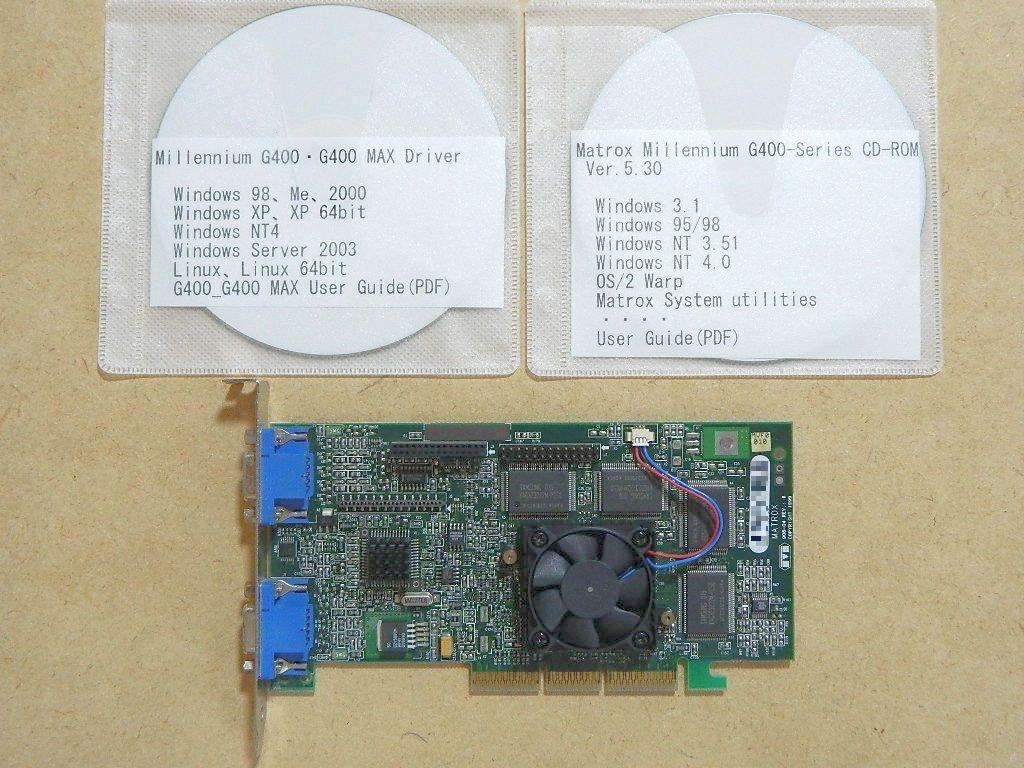
🟥Important Notice!🟩1, Most of our items are Japan Standard Spec. Such as the Voltage of electronic items, most are 100V. Please check it carefully before you purchase. If it doesn\'t fit in your country, I recommend you use a voltage converter.🟩2, Make sure you purchased the correct model number.🟩So, due to the above reasons, please double-check the pictures and description to make sure you purchased the correct item. 🟥Included Accessories & Condition Details: As shown in photos. 🟨Good Condition. This is an AGP-compatible graphics card, a Matrox Millennium G400 MAX DualHead, 32MB, with dual display support, which was kept by an acquaintance.
Matrox\'s Millennium series was known for its high image quality (clear even at high resolutions), although it was more expensive than other brands. However... while 2D image quality was excellent, 3D performance was somewhat lacking, making it unsuitable for gaming (laughs).
he main differences from the regular (non-\"MAX\") Millennium G400 (Matrox) are: RAMDAC clock: 300MHz → 360MHz , heatsink → cooling fan . Regarding its condition, there is absolutely no dust on the cooling fan, and there are no unusual noises during operation. I thought it was very quiet for a fan of this size. There were no noticeable scratches or stains, and considering its age, I think it\'s in excellent condition. Regarding the accessories, there was a CD-R: Matrox Millennium G400-Series CD-ROM Ver. 5.30 (they apparently searched for the original CD-ROM but couldn\'t find it (lol), so they brought in a backup image file which was burned onto a CD-R), and a CD-R: Millennium G400/G400 MAX Driver (apparently the final version downloaded from the Matrox website some time ago (2010?) - it \'s unconfirmed whether it\'s still available for download) . (See below for details) First, regarding the CD-R: Matrox Millennium G400-Series CD-ROM Ver. 5.30 , it contained drivers, utilities, and manuals for Windows 3.1 , Windows 95/98 , Windows NT 3.51, Windows NT 4.0, OS/2 Warp , Matrox System utilities , User Guide / PDF file . Next, regarding the CD-R: Millennium G400/G400 MAX Driver , it contains the following folder names: Millennium G400_G400 MAX Win98 WinMe Win2000 WinXP WinXP 64bit WinNT4 WinServer2003 Linux Linux 64bit *The above are the respective folder names G400_G400 MAX User Guide / PDF file It also contains a BIOS supporting G200 and G400 Series , and according to a friend\'s memo, the file name is bios_109.exe , the program name is Matrox Setup and Utilities Rev 1.09, compatible cards are Supports G200 and G400 series, and the release date was 2000/05/19. Based on the above, if you want to use the included utilities for Windows 3.1, NT 3.51, etc. , we recommend CD-R: Matrox Millennium G400-Series CD-ROM Ver. 5.30 . If you want to use the latest (final) driver , we recommend CD-R: Millennium G400/G400 MAX Driver . (For confirmation, we tried both (see operation check below)). Regarding operation, we installed it on a compatible model (with an AGP slot) brought in by an acquaintance, running Windows 98SE / the oldest Windows environment owned by both the acquaintance and myself. First, when CD-R: Matrox Millennium G400-Series CD-ROM Ver. 5.30 was inserted, it started up with autorun, Millennium G400 DualHead MAX.
It was recognized as such, and after restarting, the installation screen for various utilities appeared. I tried selecting Matrox System Utilities, Matrox DVD Player , etc., and confirmed that they could be installed successfully. Looking at the drivers in System Properties, it showed Manufacturer: Matrox Graphics, Date: 9-22-1999 . Next, after restoring the compatible model to its original state (with Windows 98SE installed), I installed the drivers from CD-R: Millennium G400/G400 MAX Driver , and in System Properties, it showed Manufacturer: MatroxGraphicsInc. , Date: 5-28-2002 . Of course, I also reconfirmed that changing the resolution, taking screenshots at \"640x480\" for better viewing, dual display display , etc., all worked correctly. If you want to use dual display, open the DualHead tab in the display properties, details , and select from DualHead Multi-Display , DualHead Clone, DualHead Zoom, DualHead DVDMax, etc. I have tried to perform as many function checks as possible and provide detailed descriptions before listing.
Although it is currently possible to operate without any problems, the equipment itself is very old, so it requires computer knowledge and software from that era, as well as troubleshooting know-how. Please understand it before purchasing.
🟩Shipping: FedEx, DHL, or UPS. 🟥Customs Duty Tax - Tariff
🟩Message from SellerHi, my name is Danny Chou. I live in Tokyo, Japan. I can speak quite fluent English :)I can source anything you want from Japan!Feel free to contact me anytime! ⬛️Check Your AddressPlease verify your address before paying, as we can only ship to addresses entered before placing the order. We cannot change an address after the order has already been placed. ⬛️TrackingWe provide valid Tracking Numbers for all orders.All our international packages will be shipped by FedEx, DHL, or UPS. ⬛️ReturnWe offer a standard return or exchange policy. The item must be returned in its original condition to receive a full refund. ⬛️PaymentPlease make your payment according to the method specified by .