When you click on links to various merchants on this site and make a purchase, this can result in this site earning a commission. Affiliate programs and affiliations include, but are not limited to, the eBay Partner Network.
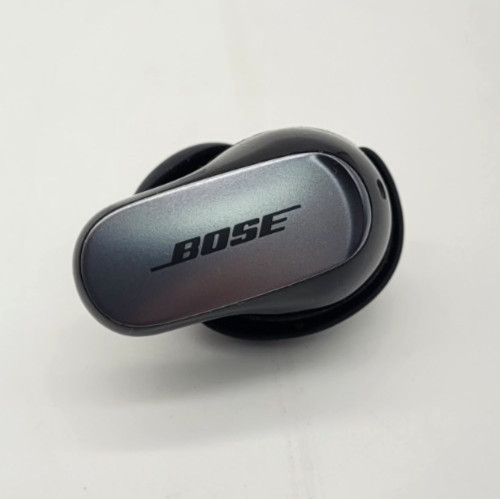
This Listing is for an BOSE Replacement QuietComfort Ultra Left or Right Side Earbuds, Case Black.
Tested and fully functional. Non-smoker owned.
To pair a replacement earbud or replacement charging case with your Bose QuietComfort Ultra Earbuds, you need to clear the memory and perform a full system reset so the hardware components can sync together.
Step 1: Remove Old Connection
Go to your phone/device’s Bluetooth menu.
Find your Bose QuietComfort Ultra Earbuds (and any LE- entries) and select Forget or Unpair.
Open the Bose App, remove the earbuds under Manage Products, and close the app.
Step 2: Reset & Sync the Hardware
Plug your charging case into a USB wall adapter (avoid using a computer USB port).
Place both earbuds into the charging case and keep the lid open.
Press and hold the Bluetooth button on the back of the case.
Continue holding for roughly 30 seconds:
Once the light turns off, release the button.
The case status light will blink white 5 times, glow amber, and then start pulsing blue slowly. This signals that the two earbuds are synced together and in pairing mode.
Step 3: Re-Pair to Your Device
Open your phone\'s Bluetooth menu and select your Bose QC Ultra Earbuds under Available Devices.
Open the Bose App and follow the prompts to complete the setup.
Firmware Mismatch Warning: If the case light blinks red and yellow/amber after trying this, the replacement part is running a different software version than your original piece. Plug the case into a computer, go to btu.bose.com, and follow the on-screen prompts to update both earbuds to the exact same firmware.
- Please Refer to our detailed pictures for cosmetic highlights/imperfections.- Items pictured are the only items included in the listing.- NOTE TO Alaska, Hawaii, US Protectorates, Additional postage charges may apply.- We usually ship items within 1 business day after sale has been paid for.- We over pack all items with packing material to ensure safe shipping.- We sell hundreds of items and do our very best to describe items as accurately as possible.- We do not claim to be AUTHORIZED Sellers/Dealers/Retailers of any of the products/merchandise we offer.- We happily offer a free, 30-Day money back guarantee on all items unless otherwise stated, yet additional Manufacturer warranty may or may not apply.- Please Note, sale/Listing price is as stated.- We have proudly been selling on for over 20 years!- Feel free to contact us with any questions.- Please come back and look again, we list items daily.Thank you for visiting our store!