When you click on links to various merchants on this site and make a purchase, this can result in this site earning a commission. Affiliate programs and affiliations include, but are not limited to, the eBay Partner Network.
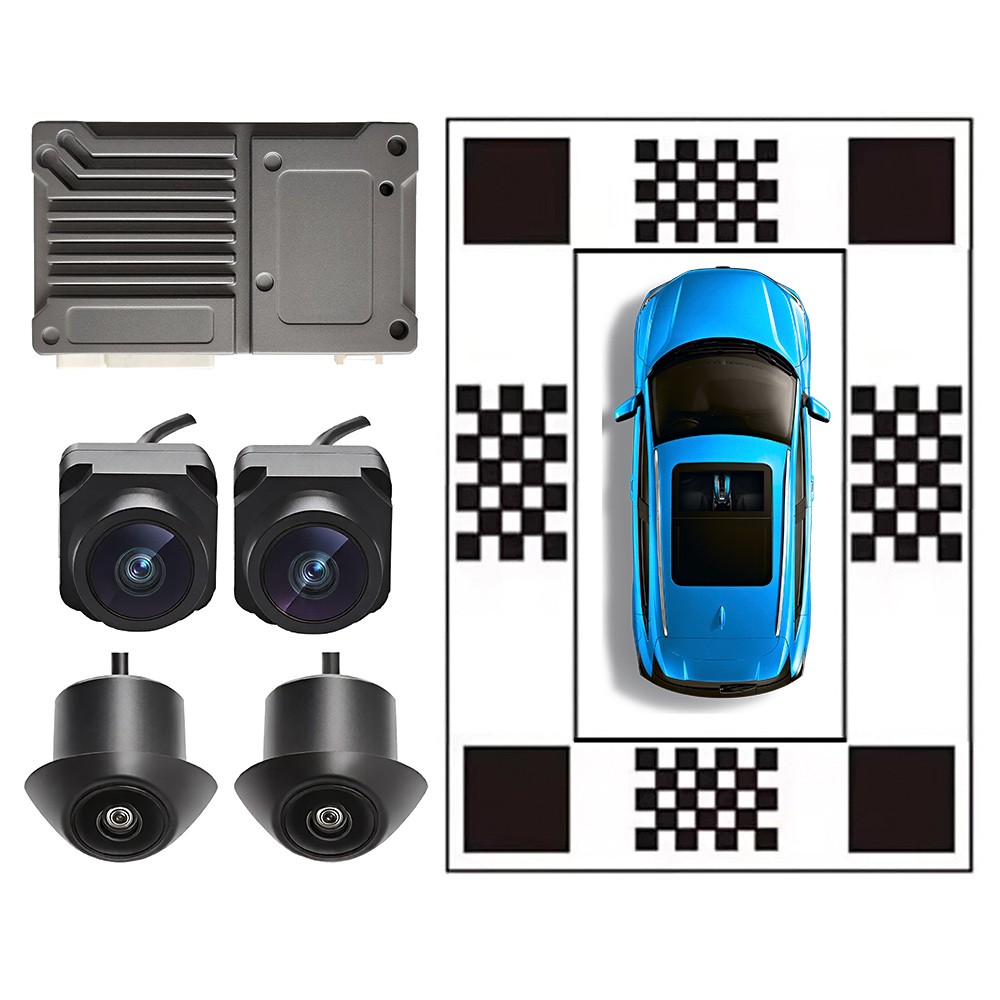
4-Channel 360°PanoramicBird EyeView DVR3D SurroundCamera System AI Detection
Full 360° View with DVR Recording
Instantly see your entire vehicle surroundings on screen with our Top View 360° camera system. It eliminates blind spots, provides a complete overview, and enhances safety while driving or parking
[This system is suitable for]
1. Compatible with screens that do not have a built-in 360° app;
2. Screen Support: Android, factory, and universal screens with AHD/CVBS/RCA input
3. Suitable for DC12V sedans, SUVs, MPVs, commercial vehicles, pickups
[Note]
1. Post-install calibration needed | Cloth not included
2. Max storage: 128GB USB (FAT 32). Sold separately
3. Max installation length 4.8m (extension cable available for longer vehicles)
4. Electronic Installation Guide (with pictures & videos) available via:
• On product packaging;
• Contacting the seller
Product Functions
1. 3D Startup Surround View
3D surround activates on car start
Real-time view of vehicle surroundings. Avoid collisions & scratches
2. AI Smart Alerts
AI Recognition - Monitors front/rear pedestrians & vehicles
AI-Activated Panoramic Function – Automatically activates panoramic view upon detecting vehicles or pedestrians
3. Night Driving View
HD-TVI Camera | HD Digital Image | Strong Light Suppression
No light night vision, clearlyilluminates the night driving scene, escortingnight driving safety.
4. Assisted Driving View
- Say goodbye to blind spots with intuitive surround views. Effectively avoid body scratches and accidental damage.
- AHD/CVBS/AV/RCA products do not support dynamic trajectory.
5. 4CH HD Recording
- Loop: Auto-overwrite on full card; manual lock for emergency clips.
- Parking: On/off toggle. Low-voltage protection prevents overcurrent & start
6. Diverse UI Display
- 3D car models can be modified according to car models; please consult the seller for details
- Car Model Transparency——Set 3D car model to transparent as needed
Product Advantages1.Smart Technology, One Step Ahead
- Auto self-test on power-on
- Streaming Rear View
- Detects surroundings, displays panoramic view, red alert for risks
2. Powerful core, Ultra-fast boot
- Hardware configuration – Equipped with Hisilicon V600, Semi-OEM Automotive Chip
3. Fast Startup
- Most 360° systems take ~10s to start; The HI V600 starts in as fast as 3 seconds – OEM-level experience, no more long waiting
Camera Advantages VS
5. 25fps → 75fps | Enter The HD World
TVI delivers 3× the clarity of AHD, FPS has reached 75 fps, High-clarity viewing with excellent night vision, no snowflakes; Better adapted for in-vehicle 360° panoramic view.
4. TVI vs AHD – Camera Advantages VSAdvantages of using HD - TVI cameras
See detail image
- Strong light suppression → clear in bright conditions
- True color → true-to-life reproduction
- Wide viewing angle → no blind spots
- Natural splicing → minimal distortion
- TVI:Finished point: Brightness/color separation for sharper image quality Cons: Max video transmission 300m
- AHD: Finished point: Max video transmission 500m Cons: Imaging resolution is lower than TVI
Product ParametersChipHI-SILICON 3520 V600CPUDual core 1.3G A7Memory4GBEffective pixels200WAperture1.6Working voltage range9-23VOperation temperature-25~+80℃Panoramic viewing range220° Fisheye wide angleVideo input format4CH AHD Video (1080P)Video output formatAHD/AV/CVBS/RCACamera signal standardTVICamera chipGC 2083Lens6048Camera waterproof ratingIP 67Video frame rate1080P 75 FPSMaximum supported USB memory128GB
[Frequently Asked Questions]
Q: Does it come with a 360°host box? No 360 app on screen?
A: Yes, Host box included. Works without app.
Q: What is the rearview camera cable length?
A: The standard cable is 6.5m (under‑seat routing).
Vehicles with >4.8m or wood floor/roof routing, please purchase an extension cable separately;
Q. How to switch the panoramic screen?
A. Front and rear/left and right view display, switch by shifting gears and turning lights.
Q: How to activate the panoramic view?
1. Vehicle start – Displays a view around for the vehicle10–15 seconds.(adjustable)
2. R gear – Activate reversing view;
3. D/N gear – Automatically switches to front view
4. Left/Right turn signal – Activates corresponding side view
5. Hazard lights – Triggers width limit mode or panoramic view (adjustable)
Q. Does the video support sound?
A. Only images are supported, not sound.
Q. If no USB storage device is inserted, is recording supported?
A. NO
Q: How much recording time per GB?
A: Approx. 8GB/hour. May vary with conditions.
Q. Can I use a USB flash drive larger than 128G?
A. No
Q: How to set the parking monitoring duration?
1. Adjustable from 1, 2, 4, 6, 24 up to 48 hours. Actual runtime depends on the vehicle's battery.
2. May cause battery drain — use with caution.
3. Features low power consumption design with low voltage protection.
Q: Installation Instructions and Tutorials?
A: We provide electronic user manuals in English/JP. Product settings & installation steps are available in the illustrated electronic tutorials.